Google Analytics 360 Vs Google Analytics 4(GA4) - Comparing Features, Benefits & Use Cases

With over 28 million websites worldwide using Google Analytics, businesses rely on it to understand key aspects of their online presence and customer behavior. Among its solutions, Google Analytics 4 (GA4) and Google Analytics 360 (GA360) are two prominent attribution models that help track user interactions, measure engagement, and make data-driven decisions.
While both share similar foundations, GA4 is a free, event-based analytics tool designed for modern tracking, whereas GA360 is an enterprise-grade solution offering unsampled data, higher data limits, and advanced integrations.
Understanding the differences, benefits, and use cases of GA4 vs GA360 is crucial for businesses looking to optimize analytics strategies and make informed decisions.
GA4, the free version of Google Analytics, offers robust capabilities for businesses seeking to understand user behavior and optimize their digital presence, allowing tracking of specific user interactions and events across websites and apps.
GA360, on the other hand, is the enterprise-level version that provides additional features and functionalities tailored to larger enterprises and advanced analytics needs, such as handling higher data volumes for in-depth analysis.
What is Google Analytics 4 (GA4)?
Google Analytics 4 (GA4) is a go-to analytics platform that accompanies an event-centric model to track user behavior across websites and apps. By incorporating machine-learning algorithms, GA4 delivers data-driven insights that forecast user behavior while maintaining robust privacy standards. GA4 provides enhanced controls, monitoring, data processing, and intuitive visualization tools to empower businesses to glean actionable intelligence and optimize digital strategies.
Google Analytics 4 (GA4) is designed to provide a more comprehensive view of user interactions by leveraging event-based tracking instead of traditional session-based models. It enables businesses to analyze cross-platform behavior, offering insights into how users engage with websites and apps seamlessly. With AI-driven insights and predictive analytics, GA4 helps businesses anticipate trends, optimize marketing efforts, and enhance decision-making. Additionally, it prioritizes privacy-first data collection, ensuring compliance with evolving regulations while still delivering actionable intelligence for businesses to refine their digital strategies.
Additionally, GA4 prioritizes data privacy and compliance, reducing reliance on cookies while using advanced modeling techniques to bridge data gaps. This ensures businesses can continue making data-driven decisions in a rapidly evolving digital landscape.
Why GA4 Is Different
GA4 is built for the future of digital analytics, focusing on smarter measurement and privacy-first insights. Unlike traditional models, it empowers businesses to connect user journeys across multiple platforms and devices without relying heavily on cookies.
Its advanced attribution approach and predictive capabilities give marketers a clearer understanding of which channels drive conversions and how users interact at every touchpoint. This makes GA4 ideal for businesses aiming to maximize ROI and stay competitive in a data-driven, privacy-conscious landscape.
Google Analytics 4 (GA4 free) - Benefits and Features
- GA4 gives a flexible data model based on events and measurements.
- GA4 easily integrates information from different devices and systems without issues.
- Enhanced Measurement routinely captures diverse interactions beyond page views.
- Customizable reporting UI via Explore for specific reports and layouts.
- Segmentation and conversion tracking based on user interactions.
- Simplified conversion tracking with a toggle switch feature.
- Real-time data validation with DebugView for accurate capture and troubleshooting.
- Seamless integration with BigQuery for advanced analytics and data visualization.

GA4 Challenges Every Analyst Must Know
- The event-based model is different from Universal Analytics, requiring users to relearn tracking and reporting.
- Unlike UA, GA4 requires custom setups for detailed insights, making reporting more complex.
- Everything is an event, meaning more work to set up and manage tracking correctly.
- GA4 only keeps data for up to 14 months, limiting long-term analysis.
- You can’t create multiple views like UA, making data filtering harder.
- GA4 defaults to data-driven attribution, making it harder to compare with UA’s last-click model.
- GA4 initially removed Bounce Rate, replacing it with Engagement Rate. Many marketers struggled to measure session quality until Google later reinstated Bounce Rate
- Unlike UA, GA4 doesn’t auto-filter internal traffic. You must manually configure filters for IP exclusions.
When to Choose GA4 Analytics Platform?
Google Analytics 4 (GA4) is the go-to choice when you need an analytics solution that aligns with modern digital tracking needs. If you're setting up analytics for a new website or app, GA4 is the default option, offering seamless cross-platform tracking across web and mobile. Unlike Universal Analytics , which relied on session-based tracking, GA4 adopts an event-based model, giving you more flexibility in understanding user interactions. Additionally, GA4 enhances ad performance through tighter integration with Google Ads, enabling more effective audience targeting.
What is Google Analytics 360?
Google Analytics 360 (GA360) is the enterprise-grade version of Google Analytics, designed for businesses that require advanced data collection, in-depth analysis, and seamless integration with other marketing tools. As part of the Google Marketing Platform, GA360 goes beyond standard analytics by removing data limitations, enhancing customization, and offering enterprise-level support.
Unlike GA4, which applies sampling on large datasets, GA360 allows businesses to collect, process, and analyze significantly larger volumes of data before encountering any sampling restrictions. This makes it ideal for organizations that handle high-traffic websites, multi-channel marketing campaigns, and complex customer journeys.
Additionally, Google Analytics 360 cost is justified by its premium support, enterprise-level SLAs, and integrations with tools like BigQuery and Google Cloud, enabling deeper insights and strategic decision-making. Organizations that require multi-touch attribution, detailed customer journey analysis, and highly accurate reporting often find the benefits of Google Analytics 360 essential for their marketing and analytics ecosystems.

Why GA360 Is Different
Google Analytics 360 (GA360) stands out as an enterprise-ready analytics solution built for scale, precision, and integration. It enables organizations to analyze massive volumes of unsampled data, making it ideal for businesses managing high-traffic websites or multi-channel marketing campaigns.
Unlike free tools, GA360 offers advanced attribution modeling and custom reporting that give enterprises a granular view of customer journeys across touchpoints. With seamless integrations into the Google Marketing Platform, BigQuery, and other enterprise tools, it empowers businesses to make faster, data-backed decisions.
For organizations requiring compliance-ready solutions, multi-touch attribution, and cross-channel performance insights, GA360 delivers the depth and scalability that modern enterprises demand.
Google Analytics 360 - Benefits and Features
- Access to unsampled reports for analyzing large datasets without limits.
- Higher data collection limits with custom dimensions, metrics, and audience definitions.
- Creation of custom funnels and remarketing audiences for deeper insights and targeted marketing.
- Advanced tools for audience discovery and evaluation to enhance reporting.
- Aggregates data from multiple properties for holistic performance assessment.
- Seamless integration with BigQuery for advanced analysis and visualization.
- Works in tandem with other Google Marketing Platform products for cross-channel campaign tracking.
- Access to dedicated Google support and specialized resources.
GA360 Challenges Every Analyst Must Know
- GA360 is expensive, with a minimum cost of $150K per year, making it inaccessible for smaller businesses.
- Requires technical expertise to properly implement tagging, data layers, and integrations.
- While GA360 reduces sampling compared to the free version, it still applies sampling in ad hoc queries and reports with large data sets.
- While GA360 integrates well with Google products, integrating with third-party tools (e.g., non-Google CRMs, CDPs) can be challenging.
- Advanced features like attribution modeling, unsampled reports, and audience segmentation require expertise.
- Offline and in-store data integration requires additional setup and external tools.
When to Choose GA360 Analytics Solution?
Google Analytics 360 (GA360) is ideal for large enterprises with high-traffic websites that require unsampled data, advanced reporting, and seamless integration with Google's marketing ecosystem. If your business relies heavily on Google Ads, Display & Video 360 (DV360), or Campaign Manager 360, GA360 provides deeper audience insights and better attribution modeling. It’s also suited for organizations with strict compliance requirements since it offers enterprise-grade SLAs and enhanced data governance.
Also Read: Google Analytics 4 vs Adobe Analytics- Which Is Suitable For You?Comparing the Features and Capabilities of Google Analytics 360 and GA4
In this comparative study, we discuss support mechanisms, tools, advertising functionalities, and data processing thresholds, illuminating the disparities between Google Analytics 360 and GA4.
| Analytics Features | Google Analytics 4 | Google Analytics 360 |
|---|---|---|
| Attribution and reporting features | Yes (Limited) | Yes (Unlimited) |
| Integration capabilities | Yes (Limited) | Yes (Extensive) |
| Custom reporting & analysis | Yes | Yes |
| Advanced analysis & segmentation | Yes | Yes |
| Real-time data & visualization | Yes | Yes |
| Data Ownership | Yes (Limited) | Yes (Unlimited) |
| Unsampled reporting | No | Yes |
| Dedicated support | No | Yes |
| Pricing | No | Yes |
Understanding the Core Differences: GA4 vs Google Analytics 360
1. Attribution and Reporting:
Both GA4 and GA360 support attribution modeling, multi-channel reporting, and campaign measurement. However, GA360 provides advanced capabilities like data-driven attribution, advanced segmentation, and higher limits for data collection, reporting, retention, and export to BigQuery.
| Attribution and reporting feature | GA4 | GA360 |
|---|---|---|
| Attribution modeling | YES | YES |
| Multi-channel Reporting | YES | YES |
| Campaign Measurement | YES | YES |
2. Integration Capabilities:
Both GA4 and GA360 offer integrations with platforms like Salesforce and AdWords, but GA360 includes additional integrations like DoubleClick and more advanced API options for data-driven attribution.
| Integration capabilities | GA 4 | GA 360 |
|---|---|---|
| Salesforce Integration | YES | YES |
| Data-Driven Attribution Model | NO | YES |
| Adwords Integration | YES | YES |
| DoubleClick Integration | NO | YES |
3. Custom Reporting and Analysis
GA4 offers custom reporting features, but unlike GA4 360, it does not include custom unsampled tables, advanced analysis reporting interfaces, or custom funnel reporting. These additional functionalities are exclusive to GA4 360, which is part of the Google Marketing Platform suite and is intended for larger enterprises with higher data processing requirements.
| Custom reporting and Analysis | GA4 | GA360 |
|---|---|---|
| Custom reporting | YES | YES |
| Custom unsampled tables | NO | YES |
| The advanced analysis reporting interface | YES ( Limited ) | YES |
| Custom funnel reporting | YES | YES |

4. Advanced analysis and segmentation
Google Analytics 4 (GA4) and Google Analytics 360 (GA360) both offer advanced analysis and segmentation capabilities, but GA360 provides more advanced Segmentation options and customizable analytics alerts compared to the standard features available in GA4
| Advanced analysis and segmentation | GA4 | GA360 |
|---|---|---|
| Advanced segmentation | YES | YES |
| Analytics alerts | YES | YES |
5. Real-time data and visualization
GA4 and GA 360 both feature real-time data and visualization capabilities, offering flow visualization for various purposes including rapid decision-making and supporting real-time streaming data visualization, which helps users monitor and analyze data as it is being generated and processed
| Real-time data and visualization | GA4 | GA360 |
|---|---|---|
| Real-time data | YES | YES |
| Flow visualization | YES | YES |
6. Google Analytics Pricing
Google Analytics 360 starts at $150,000/year, providing enhanced features and dedicated support. This price tag makes it ideal for larger enterprises with complex data analytics requirements. Businesses can access higher data thresholds, unsampled reporting, and more advanced segmentation features.
For smaller businesses or those just starting with analytics, GA4 (the free version) may be more appropriate. However, if you need access to unsampled reports, higher data limits, and custom support, Google Analytics 360 is the superior option.
| Real-time data and visualization | GA4 | GA360 |
|---|---|---|
| Subscription Cost | YES | Starts at ~$150K/year (varies by usage) |
| Unsampled Data Processing | NO | YES |
| Higher Data Limits | NO | YES |
| Enterprise Support & SLAs | NO | YES |
| BigQuery Export Limits | Limited | Unlimited |
| Premium API Access | No | Yes |
Emerging Trends in Google Analytics (2025 and Beyond)
As digital analytics continues to evolve, both Google Analytics 4 (GA4) and Google Analytics 360 (GA360) are adapting to new industry requirements and user expectations. In 2025, businesses are focusing on privacy-first measurement and AI-driven insights to make more informed decisions.
Key trends shaping the future of analytics include:
- AI-powered predictive modeling to anticipate user behavior and improve marketing performance.
- Enhanced cross-platform tracking for seamless measurement across websites, mobile apps, and connected devices.
- Stronger compliance frameworks ensuring adherence to evolving data privacy regulations such as GDPR and CCPA.
- Cookieless measurement capabilities to maintain data accuracy in a privacy-conscious ecosystem.
These updates make it essential for businesses to assess whether GA4 or GA360 better aligns with their long-term analytics goals and data strategies.
How will Xerago help you with Digital Analytics?
At Xerago, we redefine digital data management beyond conventional measures. Our approach ensures precision-driven analytics, enabling comprehensive tracking, measurement, and analysis of user behavior while maintaining privacy compliance.
We provide insights to help businesses explore the best analytics tools, including Google Analytics 360 (GA360) and Google Analytics 4 (GA4), to gain valuable data, consolidate customer insights across platforms, and enhance audience profiles. Understanding the differences between GA4 vs GA360 allows organizations to activate targeted audiences, improve conversion rates, and implement data-driven personalization strategies with systematic experimentation.
Moreover, our commitment goes beyond implementation. We offer ongoing support and maintenance to ensure Google Analytics 360’s benefits, such as unsampled reporting, advanced attribution modeling, and seamless BigQuery integration, remain accurate, reliable, and actionable for your business success.
Frequently Asked Questions related to Google Analytics
1. Is GA4 replacing Google Analytics?
Yes! GA4 has officially replaced Universal Analytics (UA) as of July 1, 2023. If you haven’t switched yet, your data is no longer being processed in UA. GA4 is more advanced, focusing on event-based tracking, AI-powered insights, and a privacy-first approach.
2. Is Google Analytics 360 free?
No, GA360 is a premium, paid version of Google Analytics designed for enterprises. It offers advanced features, higher data limits, and dedicated support. The standard GA4 version remains free.
3. Why upgrade to GA4?
GA4 is the future of analytics and upgrading ensures:
- Continued data tracking (UA is no longer supported).
- More accurate insights with event-based tracking instead of session-based.
- Better user privacy compliance in a cookieless world.
- AI-powered predictions for smarter decision-making
4. Can you upgrade from GA4 to GA360?
Yes. you can upgrade an existing GA4 property to GA360 if your organization signs a GA360 contract. This gives you access to enterprise-level features such as unsampled reporting, advanced integrations, and dedicated Google support.
5. Which is better: GA4 or GA360?
It depends on your needs:
- GA4 → Best for businesses seeking free, AI-powered, and privacy-focused analytics.
- GA360 → Ideal for large enterprises handling massive datasets, requiring unsampled reporting, and advanced integrations.
6. Does GA360 support event-based tracking like GA4?
No. GA360 uses the session-based data model, whereas GA4 focuses on events. This makes GA4 better suited for cross-platform analytics and customer journey mapping.

Ram Prabhakar
Head of Solutions and Content
Ram Prabhakar is a seasoned marketing and solutions professional. He has an MBA and B.Tech degrees from two of the renowned Universities in India. He has over 15 years of experience in providing marketing solutions to large brands, including those from the Fortune 500 like Citi, Intel, PayPal, and Mastercard, to name a few. Combining his creative, marketing, and engineering skills, Ram Prabhakar is adept at providing solutions that not only look engaging but also create value.
Xtelligence Inbox.
Your weekly dose of marketing smarts!
Related Posts




Digital Analytics
Stop Treating Claude Like Just Another Chatbot. Start Using It Strategically.


Digital Analytics
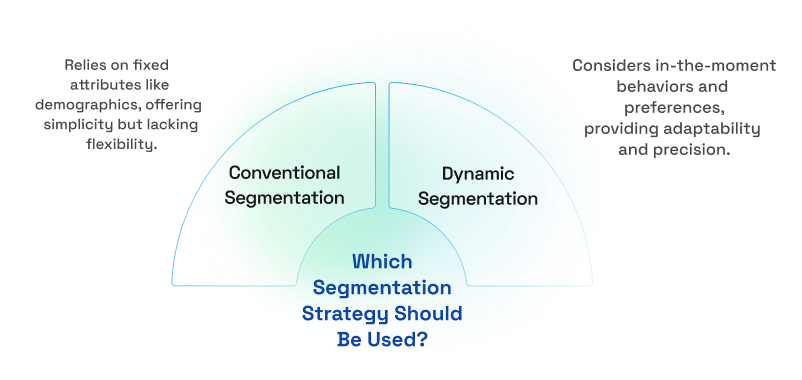
Customer Segmentation: Using Predictive & Adaptive Models for Targeted Marketing