---blog Title---
7 Best Tag Management Systems to Streamline Data Tracking
---desktop---

---mobile---

Tags play a crucial role in website data collection, helping businesses track visitor behavior, measure conversions, and analyze campaign performance. With the right tags in place, companies gain invaluable insights that drive smarter decisions and enhance the digital experience.
However, managing an ever-growing number of tracking codes for analytics, advertising, personalization, and 3rd party tag management tools can quickly become a burden. Without a scalable system in place, websites may suffer from slow load times, tracking errors, and inconsistent data—compromising accuracy and performance.
That’s where tag management comes in. A tag management Solution (TMS) helps organize,f, and update tracking tags efficiently, ensuring faster website performance, improved data accuracy, and easier campaign tracking—all without relying on developers.
Tag management software simplifies digital tracking by offering a centralized interface to manage all tags without touching the website code every time. Whether you're working with analytics, advertising, or personalization tags, this software allows teams to control when and how tags fire, saving time and reducing the need for constant developer support.
In this blog, you’ll discover:
- What tag management is and why it matters
- How tag management systems work
- The best tag management tools available
- Key factors to consider when choosing the right TMS
By the end, you’ll know exactly how to simplify tracking, improve efficiency, and optimize your analytics strategy.
What Is Tag Management?
Tag Management is the process of managing and deploying digital tracking codes (or "tags") on a website or app without requiring manual code changes. These tags are small pieces of JavaScript or pixels used for analytics, marketing, and other tracking purposes. A Tag Management System (TMS), like Google Tag Manager (GTM), Adobe Launch, or Tealium, helps businesses organize and control their tags efficiently. Instead of adding individual tags to the website code, a single tag management container is placed, which then dynamically loads and executes the required tags.
---outlined-cta---
[ Free Web Analytics Audit Checklist ] to fix gaps and boost tracking accuracy - Download Now
What is Tag Management Solution?
A Tag Management Solution (TMS) is a platform that simplifies the process of managing and deploying tracking codes on a website or app. It allows marketers, analysts, and developers to control when and how tags are fired without needing to modify the website’s source code directly.
Tags are small snippets of JavaScript or HTML that collect data and send it to third-party services like Google Analytics, Facebook Pixel, marketing automation tools, A/B testing platforms, and advertising networks. It is essential for businesses that rely on digital marketing, analytics, and customer experience tools. It improves efficiency, accuracy, and scalability while reducing IT workload and enhancing website performance.
When to Adapt a Tag Management Solutions?
- If you have limited visibility into tag performance, data accuracy, and user behavior tracking.
- Over-reliance on the IT team or developers for tag implementation is a common sign that it’s time to move to a more scalable and centralized tag management system.
- If you aim to broaden your marketing efforts and track additional data beyond basic analytics, modern tag management tools support integration with 3rd party tag management platforms and other martech systems.
- When existing marketing solutions are restrictive, you need a more dynamic tag management approach—one that allows for rapid deployment, modification, and removal of tags to match evolving strategies and requirements.
Why Enterprise Businesses Need Robust Tag Management
If you manage multiple websites, apps, or digital properties, you're likely dealing with a growing list of marketing tags. Without a scalable tag management solution, this complexity can lead to tracking issues, data gaps, and increased pressure on IT teams.
That’s where enterprise tag management comes in. When you're handling large data volumes, privacy compliance, and multi-platform campaigns, you need more than basic tagging. Enterprise platforms offer features like server-side tagging, real-time data orchestration, and consent governance ensuring accuracy and compliance with laws like GDPR and CCPA.
For large organizations, it's not just about managing tags; it’s about enabling speed, governance, and integration at scale. A robust tag management system helps teams collaborate better, improve performance, and stay in control across every digital touchpoint.
Top Tag Management Platforms for 2025
As businesses adopt more advanced data strategies, choosing the right tag management platforms becomes critical. These solutions offer scalable, integrated capabilities that simplify tracking across websites, mobile apps, and third-party systems.
Here’s a curated list of the top seven tag management platforms currently leading the market:
- Adobe Dynamic Tag Management
- Google tag manager
- Tealium IQ
- Tag commander
- Ensighten Manage
- Qubit
- Piwik PRO Tag manager
Let's explore each TMS in detail and how it helps with tagging.
1. Adobe Experience Platform Launch
Adobe Experience Platform Launch, formerly Adobe Dynamic Tag Management, helps businesses efficiently deploy and manage website tags while integrating seamlessly with Adobe products. Originally introduced as a dynamic tag management solution, the platform has since evolved into a modern system that supports real-time, rules-based tag execution.
Designed for enterprise users, it simplifies tag implementation, enhances flexibility, and ensures accurate data collection. This tool empowers teams to optimize their digital experiences with advanced capabilities, making tag management more efficient and reliable.
Key Features:
- Rule Builder: Create complex tagging rules using an intuitive drag-and-drop interface.
- Open API Architecture: Integrate with various third-party solutions for extended functionality.
- Extension Library: Utilize a wide range of pre-built extensions to enhance tag management capabilities.
- Custom Event Triggers: Set specific conditions to trigger tags based on user interactions.
- Debugging Tools: Test and troubleshoot tags before deploying them live.
| Pros | Cons |
| Simplifies the tag deployment process, reducing dependency on IT teams. | Can be complex and overwhelming for beginners. |
| Seamless integration with Adobe's marketing and analytics products. | Requires familiarity with Adobe's ecosystem for optimal use. |
URL: https://experienceleague.adobe.com/docs/launch.html
2. Google Tag Manager (GTM)
Google Tag Manager (GTM) is a powerful solution that simplifies tag deployment for websites and mobile apps, allowing marketers and administrators to manage tracking codes without altering the underlying code. It enhances workflow efficiency, improves data accuracy, and streamlines marketing operations, making it an essential tool for businesses looking to optimize their online presence.

Key Features:
- Asynchronous Tag Loading: Ensures that tags load independently, preventing delays in page load times.
- Multi-Account Support: Manage multiple accounts and containers from a single interface, making it easier to handle different projects.
- Server-Side Tagging: Enhance security and performance by moving tag execution to a server environment.
- Built-in Templates: Use pre-built templates for common tags like Google Analytics, AdWords, and more.
- Preview and Debug Mode: Test and troubleshoot tags before publishing them live.
| Pros | Cons |
| Easy and quick setup process, even for non-technical users. | Limited customization options for advanced technical users. |
| Versatile handling of various tags, including third-party tags. | May require some learning curve for beginners to understand advanced features. |
URL: https://marketingplatform.google.com/about/tag-manager/
---outlined-cta---
Improve Campaign Attribution Through Better Tag Management - Get the Template
3. Tealium IQ
Tealium Tag Management System is built for enterprise teams that need flexibility, scale, and real-time control across their digital properties. It streamlines tag deployment, integrates with hundreds of vendors, and supports advanced privacy controls—making it a trusted solution for businesses with complex data needs.
Key Features:
- Tag Marketplace: Access 1,000+ vendor integrations to support diverse martech stacks.
- Data Layer API: Manage and control the flow of data across your digital ecosystem for better data accuracy.
- Real-Time Data Collection: Capture interactions as they happen for faster, smarter decision-making.
- AudienceStream Integration: Combine with Tealium's Customer Data Platform for advanced audience segmentation and targeting.
- Privacy and Compliance: Ensure compliance with global data privacy regulations through built-in features.
| Pros | Cons |
| High scalability and robust performance metrics. | Can be overwhelming and complex for small businesses with limited resources. |
| Extensive vendor integrations and a user-friendly interface. | Higher cost compared to some other tag management tools. |
URL: https://tealium.com/products/tealium-iq-tag-management-system/
4. Tag Commander
Designed for privacy-conscious businesses, this tag management solution ensures compliance with data protection regulations while optimizing tag deployment. It streamlines data collection across websites and mobile apps, enhances security, and provides robust control over tagging processes, making it a valuable asset for organizations focused on privacy and performance.
Key Features:
- Consent Management: Built-in features to manage user consent and ensure compliance with privacy regulations like GDPR.
- Tag Sequencing: Control the order in which tags fire to optimize performance and data accuracy.
- Mobile App Support: Extend tag management capabilities to mobile applications for consistent data collection across platforms.
- Dashboard and Reporting: Gain insights into tag performance and data collection through comprehensive reporting tools.
- User Permissions: Control access and permissions for different team members to manage tags securely.
| Pros | Cons |
| Strong emphasis on privacy compliance and data security. | Limited support for third-party integrations compared to other tools. |
| User-friendly interface for easy tag deployment and management. | May require some learning curve to fully utilize advanced features. |
URL: https://www.commandersact.com/en/solutions/tagcommander/
5. Ensighten Manage
Built for organizations with strict data privacy requirements, this solution ensures secure data collection and seamless integration with marketing technologies. It enables omnichannel tracking, enhances mobile engagement analytics, and provides robust privacy controls to comply with regulations like GDPR and CCPA, making it a trusted choice for businesses prioritizing data security and compliance.
Key Features:
- Omnichannel Data Collection: Gather data from various channels, including web, mobile, and offline, for a comprehensive view of user interactions.
- Mobile App Engagement Tracking: Track user interactions within mobile applications to optimize mobile experiences.
- Robust Data Privacy Controls: Ensure data security with reliable data centers and privacy features to comply with regulations like GDPR and CCPA.
- Dynamic Tag Creation: Create and manage tags dynamically based on user behavior and interactions.
- Integration with MarTech Stacks: Seamlessly integrate with existing marketing technologies to enhance data collection and analysis.
| Pros | Cons |
| High level of security and compliance with data privacy regulations. | Can be expensive for small businesses with limited budgets. |
| Seamless integration with existing marketing technologies. | May require technical expertise for initial setup and configuration. |
URL: https://www.ensighten.com/products/tag-management/
6. Qubit OpenTag
Qubit OpenTag empowers businesses with advanced tag management capabilities, designed to support experimentation, personalization, and testing. As a flexible Opentag platform, it enables marketing teams to implement and manage tags efficiently especially in A/B testing environments where agility and precision matter.
This tag management solution offers seamless integration with Qubit’s experimentation tools, allowing you to activate campaigns quickly and collect real-time insights. Whether you’re optimizing customer journeys or testing different user flows, Opentag ensures performance tracking without compromising site speed.
Key Features:
- AB Testing Integration: Seamlessly integrate with Qubit's AB testing platform to optimize website performance and user experience.
- Extensive Tag Library: Access a wide range of tags for various marketing needs, including third-party tags.
- User-Friendly Interface: Manage and update tags easily without requiring advanced technical skills.
- Custom Event Triggers: Set specific conditions to trigger tags based on user behavior and interactions.
- Real-Time Reporting: Gain insights into tag performance and data collection through real-time reporting tools.
| Pros | Cons |
| Customizable solutions to meet unique business needs. | Limited support for non-AB testing features and advanced customization |
| Strong support for experimentation and data-driven decisions | Higher cost compared to some other tag management tools |
URL: https://www.qubit.com/products/opentag/
7. Piwik PRO Tag Manager
Piwik PRO Tag Manager is designed for organizations that prioritize data privacy and regulatory compliance while managing website tags efficiently. It provides a user-friendly environment that simplifies tag deployment, enabling marketers to maintain control over data collection without deep technical expertise. With a focus on security and structured tag execution, it helps businesses optimize performance while ensuring adherence to global privacy standards.
Key Features:
- Consent Management: Built-in features to manage user consent and ensure compliance with privacy regulations like GDPR.
- Tag Sequencing: Control the order in which tags fire to optimize performance and data accuracy.
- Mobile App Support: Extend tag management capabilities to mobile applications for consistent data collection across platforms.
- Dashboard and Reporting: Gain insights into tag performance and data collection through comprehensive reporting tools.
- User Permissions: Control access and permissions for different team members to manage tags securely.
URL: https://piwik.pro/tag-manager/
Which Tag Management System Is Right for You?
Different industries have different data needs, compliance requirements, and user expectations. Choosing the right tag management system isn’t just about features; it’s about how well it fits your business environment.
Here's how some of the top tag management platforms align with real-world use cases:
- For privacy-first industries like healthcare, government, and finance, platforms such as Ensighten and Piwik PRO are designed with strict compliance and data governance in mind. They offer strong consent management, audit controls, and enterprise-grade security.
- For eCommerce and media companies focused on agility, campaign velocity, and A/B testing, Qubit OpenTag provides real-time control over tag firing—ideal for optimizing customer journeys and delivering personalized experiences at scale.
- For SMBs and marketing teams without heavy IT support, Google Tag Manager (GTM) offers a lightweight, easy-to-use interface that supports fast deployment and seamless integration with common martech tools.
- For large enterprises managing complex data environments, customer data platforms, and global properties, solutions like the Tealium Tag Management System and Adobe Launch provide advanced orchestration, scalability, and deep integration with analytics and experience platforms.
---outlined-cta---
Standardize Tag Audits Across Digital Properties - Get the Template
How a Tag Management Solution Works in Real-Time
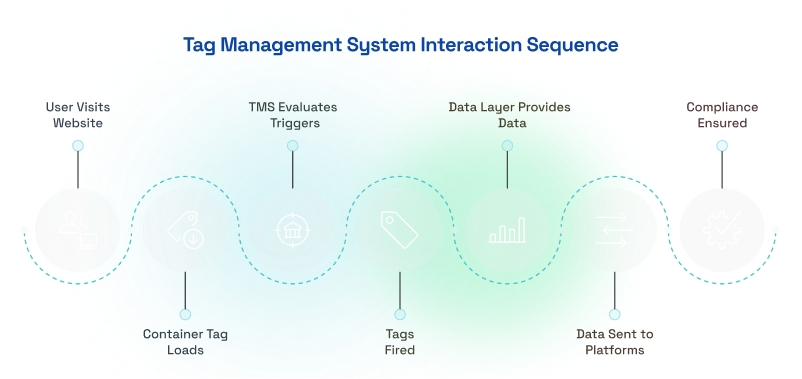
- When someone lands on a webpage, the TMS container tag (a small piece of code) instantly activates in the background.
- Once the Tag Management System (TMS) is activated, it checks a set of predefined rules to determine what needs to happen. Should it track this visit? Should a tag fire when the user watches a video? Or should it wait until they click a button?
- As the visitor scrolls, clicks buttons, or fills out a form, the TMS decides which tracking tags need to be executed. For example, if they click on a "Buy Now" button, a conversion tracking tag fires to record the purchase.
- Behind the scenes, the data layer is continuously storing and organizing key details—such as the current page, the user’s device type, or the items they’ve added to their cart. This ensures that each tracking tag receives the right information without manually scanning the webpage every time.
- Once the tags fire, they send collected data to various platforms. Google Analytics logs the session, Facebook Pixel records an ad conversion, and CRM systems update customer profiles.
- If a user has denied tracking permissions (such as disabling cookies), the TMS ensures that restricted tags do not fire. This helps businesses stay compliant with privacy regulations like GDPR and CCPA while respecting user preferences.
7 Factors to Consider When Choosing a Tag Management Solution
- Ease of Use & Deployment – A TMS should have a user-friendly interface that allows marketers to manage tags without relying heavily on developers. Quick deployment and easy updates ensure efficiency in tracking implementation.
- Integration with Marketing & Analytics Tools – The solution should seamlessly connect with platforms like Google Analytics, Facebook Pixel, and CRM systems. It should also support both client-side and server-side tracking for comprehensive data collection.
- Performance & Website Speed – A good TMS ensures that tags load efficiently without slowing down your website. It should support asynchronous tag execution to maintain site speed and avoid conflicts between different scripts.
- Data Layer Support & Flexibility – The system should effectively handle structured data, allowing businesses to capture and use custom event data. A flexible TMS enables dynamic updates to tracking conditions based on user interactions.
- Compliance & Privacy Controls – Given strict privacy laws like GDPR and CCPA, the TMS should include built-in consent management and the ability to block unauthorized tracking. Audit logs and permission settings help maintain compliance.
- Scalability & Multi-Site Support – If your business operates multiple websites, subdomains, or mobile apps, the TMS should support them all under a unified system. It should also handle high-traffic volumes without performance issues.
- Tag Debugging & Error Handling – Real-time debugging tools and built-in error reporting ensure smooth tracking. The system should make it easy to troubleshoot issues, validate tags before publishing, and receive alerts when errors occur.
---outlined-cta---
Improve Tag Governance Through a Unified Audit Framework - Download the Template
Conclusion
As websites became more complex, the need for a faster, more scalable solution grew. This led to development of solutions like Google Tag Manager, Tealium , and Adobe Launch. Today, businesses are shifting towards server-side tagging, which improves data accuracy, enhances page performance, and gives brands more control over what data is shared with third parties. AI-driven analytics are also shaping the future, using automated insights and predictive tagging to refine customer experiences.